At a glance
- Punch passes can now be sold straight to a customer, with in-person payment or an emailed payment link.
- Price changes to memberships and fees can apply to new customers only or to everyone. Each change is kept in a version history.
- Repeating schedule items can now repeat every other week, monthly, quarterly or yearly. Before, they could only repeat weekly.
- Receipts now show card details, and businesses can add an optional signature line and their own terms.
- Overdue memberships can be cleared with cash, check or app payments (Zelle, Venmo and similar).
- Printable ID cards for members and staff, each with a QR code for check-in.
- Parents can buy a membership for a family member in the online store.
Screenshots come from a demo business. Words like “Patient”, “Treatment”, “Workshop” and “Practitioner” are that business's custom labels for customers, services, classes and staff. Each business can choose its own. Select a screenshot to view it full size.
Sell and assign punch passes directly to customers
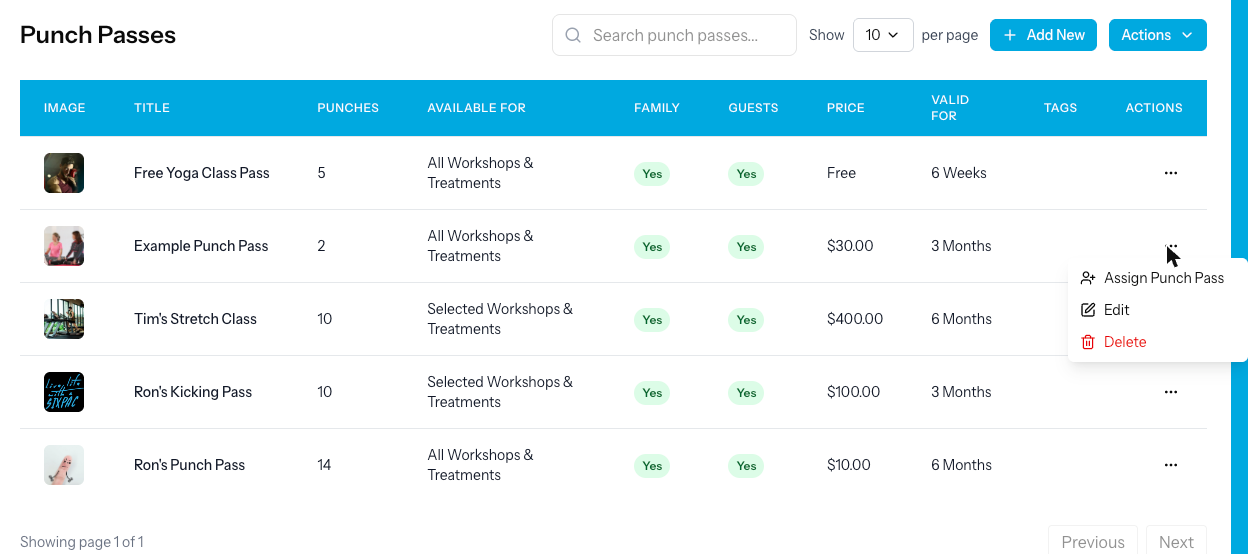
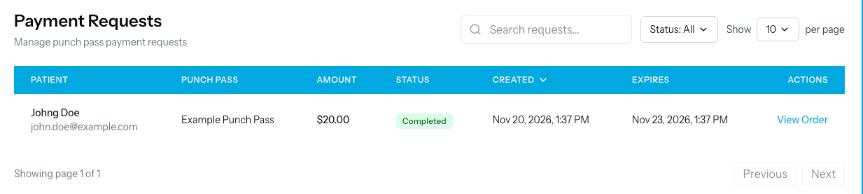
Staff can assign a punch pass to a customer from the Punch Passes list. They can take payment on the spot or email the customer a secure link to pay online. A new Payment Requests page tracks every link that has been sent.
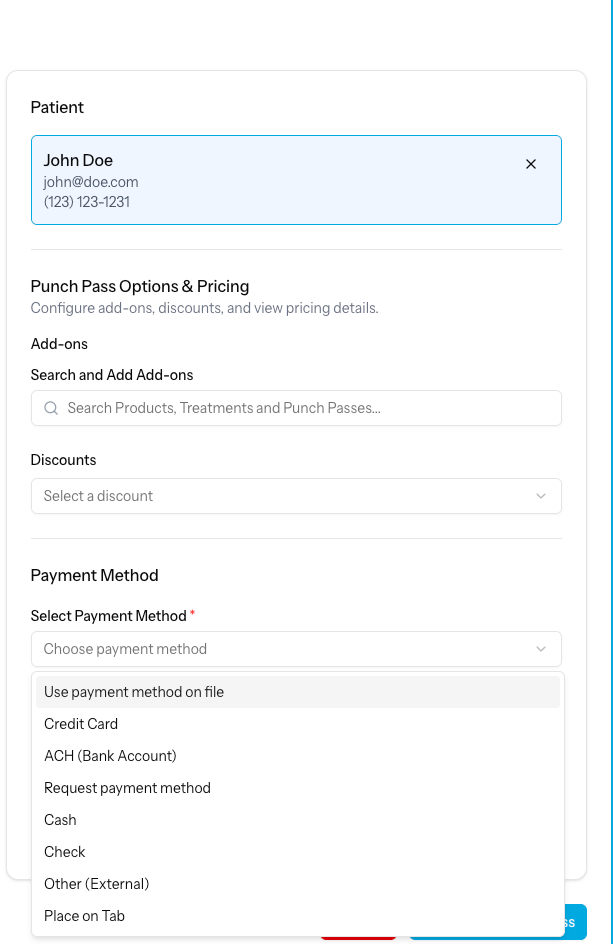
- Adjust the price and quantity, and add optional add-ons and discounts.
- Payment options are a card on file, a new card, a bank account, cash, check, another outside payment type, or the customer's open tab.
- Punch passes can renew automatically when they expire, billed to the customer's saved card or bank account.
- Payment links expire after 1 to 7 days. Staff can see each link's status (Pending, Completed, Expired or Cancelled) and resend or cancel it.
Change membership and fee prices for everyone at once, with a full history
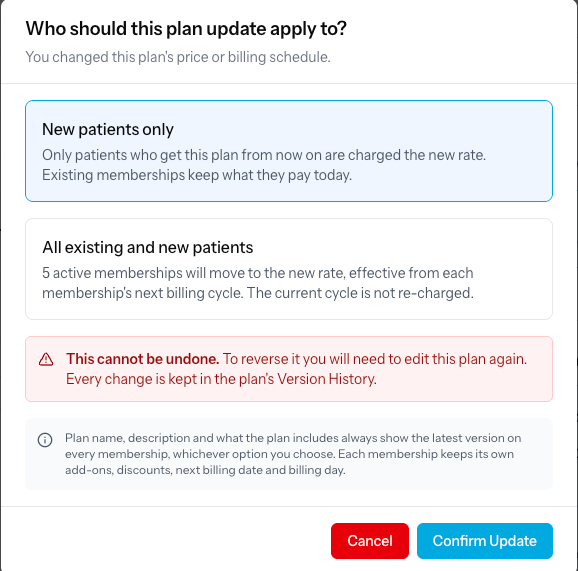
When a business changes the price or billing schedule of a membership plan or recurring fee, it now chooses who the change applies to: new customers only, or existing and new customers. Every change is saved in a version history that shows what changed, when, and who made it.
- The confirmation screen shows how many active memberships will move to the new price. Customers on custom pricing are left out.
- Existing customers move to the new price at their next billing cycle. Nobody is charged again for the current cycle.
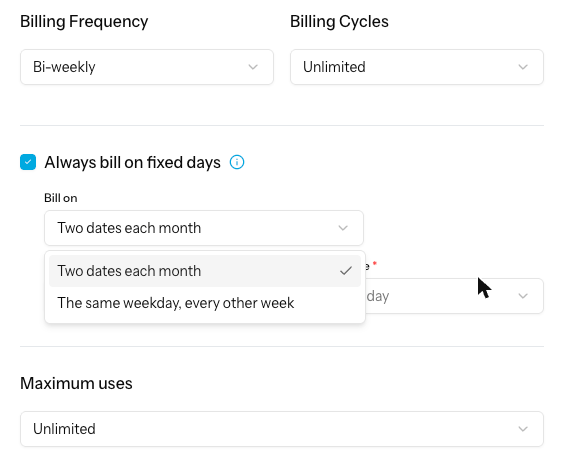
- Fees can now bill on a set day. Bi-weekly plans can bill on two set dates each month (for example the 1st and 15th) or on the same weekday every other week.
- On a customer's profile, staff can give one customer their own price, see that customer's price history, and reset them to the plan's current price.
More ways to repeat classes, appointments and space bookings
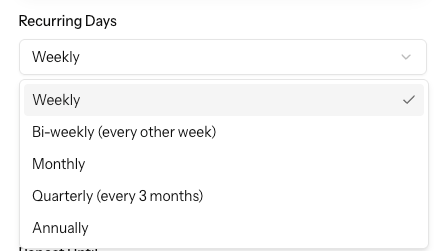
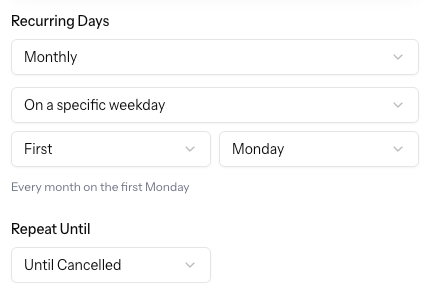
Repeating calendar items used to be weekly only. They can now repeat weekly, every other week, monthly, quarterly or yearly. Monthly and quarterly items can fall on a set date (the 15th) or a set weekday (the first Monday).
- A plain-language line confirms the pattern, for example "Every month on the first Monday."
- A punch pass that will have expired by a future session's date can no longer be used to pay for that session.
- When a membership is cancelled, any future sessions it already paid for go back to unpaid, so staff know to collect payment.
Customizable receipts with card details, a signature line and store terms
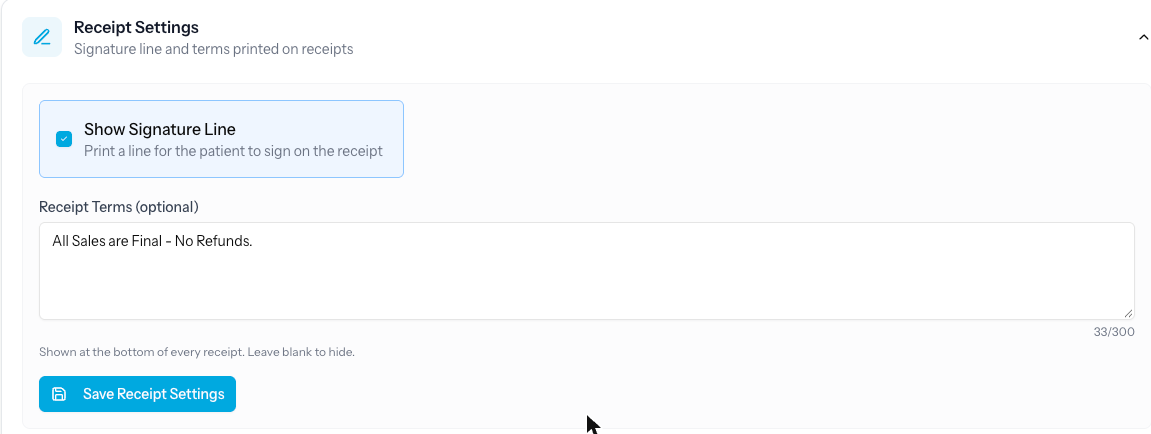
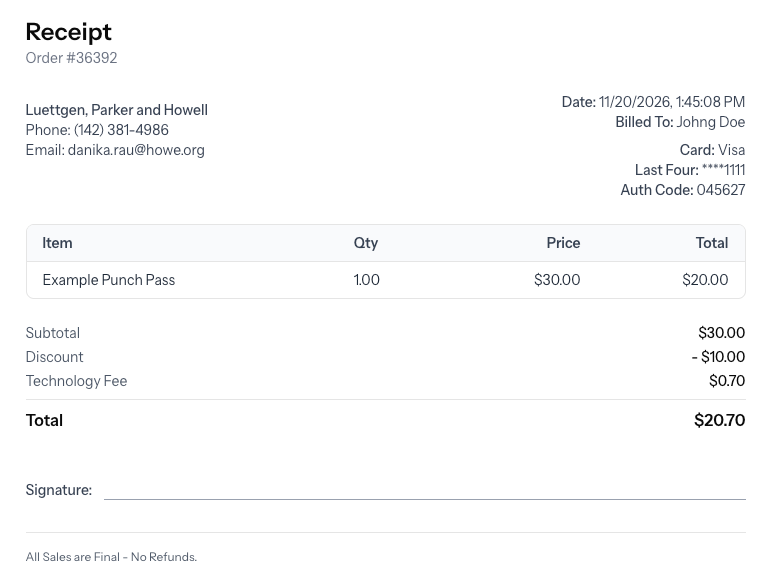
A new Receipt Settings section lets a business add a signature line and its own terms, such as a return policy, to the bottom of every receipt. Card payments on receipts now show the card type, the last four digits and the approval code. Empty $0.00 lines for discount, shipping, tax or tip are no longer shown.
Clear overdue memberships with cash, check or payment apps
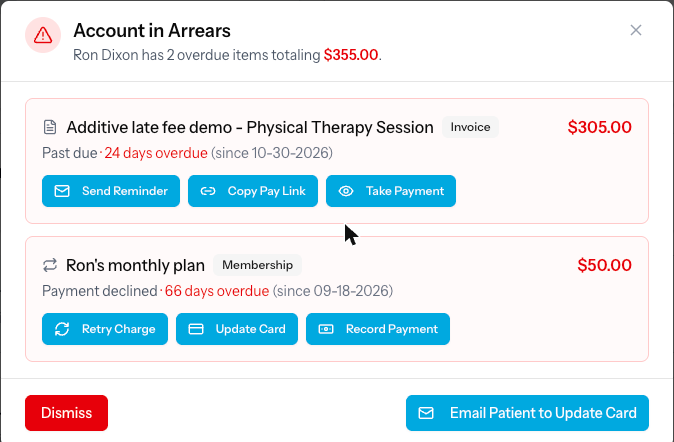
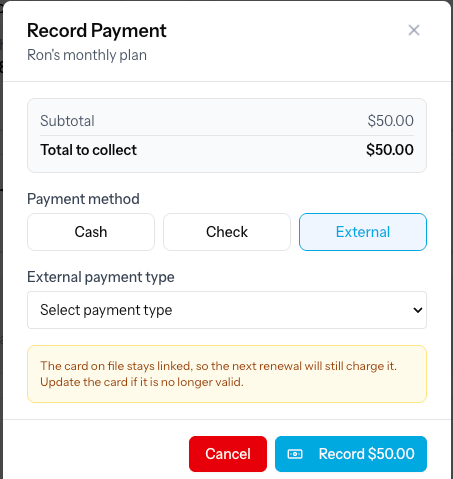
When a customer's card is declined for a membership or punch pass, staff can now record a payment the customer made another way: cash, check, or an app such as Zelle, Venmo, Cash App or PayPal. The account is brought up to date, and the card on file stays in place for future renewals.
- A new Record Payment button sits next to Retry Charge and Update Card.
- Staff see the full amount due first, including tax, late fees and any missed billing periods.
- No technology fee is added. The customer gets their usual renewal receipt if the business sends those.
Printable ID cards for members and staff
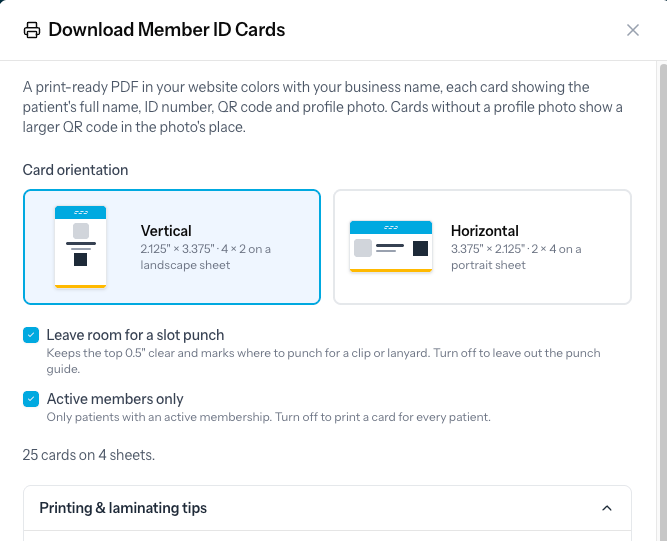
Businesses can download print-ready ID cards for members, customers and staff. Each card uses the business's name and website colors and shows the person's name, photo, ID number and a QR code that staff can scan at check-in.
- Print every active member at once, everyone, or a single card from a person's row.
- Choose a vertical or horizontal layout, with optional room for a lanyard slot.
- A built-in printing and laminating guide is included.
Buy a membership for a family member in the online store
Signed-in parents can now choose who a membership is for (themselves or a family member, such as a child) when buying online. The membership goes on that family member's profile, and the parent's card pays for it and for every renewal.
- Renewal reminders, receipts and late-fee emails for a child's membership go to the parent or guardian.
- Parents can see the memberships they pay for in their customer portal.
- Fixed a problem where an online order with two or more memberships could charge the customer without setting up the memberships.
Time Clock Report for the whole team
The Time Clock Report can now be run for all staff at once. It shows daily team totals and each person's hours, and you can click any name to see their clock-ins and clock-outs. The Excel download has a team summary tab plus a tab for each staff member, which speeds up payroll review.
Stock warnings at the register
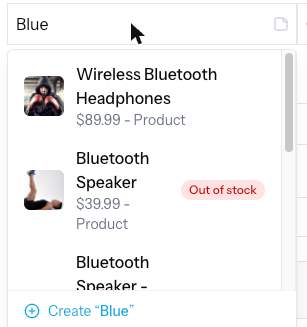
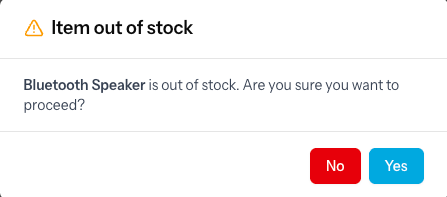
The Virtual Terminal now flags products that are out of stock or running low (10 or fewer left) while staff ring up a sale. Staff confirm before adding an out-of-stock item or selling more than is on hand. Oversells are caught without blocking a sale that has to go through.
Check-in times in the Attendance Report
The attendee list now shows the date and time each person checked in, in the business's local time. It can be sorted by that time and is included in the download. Service and space bookings where the customer checked in now count as attended, even if staff never marked them complete.

No misleading billing dates on memberships that won't renew
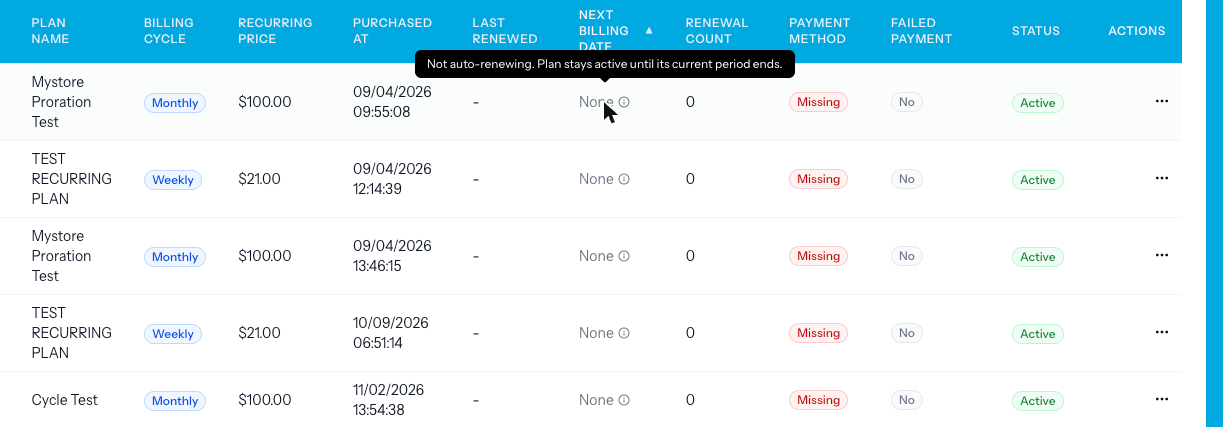
Active memberships set not to auto-renew now show "None" as their next billing date instead of a date that suggested a payment was coming. Hovering over it explains that the plan stays active until its current period ends. These memberships are no longer marked as past due, and exports match the screen.
Fixes
Businesses can use any discount code they like
Before, a code such as "SUMMER10" could only be used by one business on the whole platform. Codes now only need to be unique within each business. Codes that differ only in upper or lower case ("vip" and "VIP") count as the same code.
Walk-in services can be booked from the Schedule
Services that don't require advance booking, like drop-in visits, now appear when staff add an appointment from the Schedule.
Clearer declined payments, better customer search, and Tabs for multi-business customers
A rejected online invoice payment, such as one with an invalid bank routing number, is now recorded as declined, and the customer sees a clear "declined" message. Customer search and profiles now work for customers in a family with no name. Customers linked to more than one business can open their Tabs in the portal and mobile app.
Clearer Quick Sale errors and safer photo uploads
If a Quick Sale has only a first name or only a last name, staff get a clear message before any card is charged. A customer's existing profile photo is no longer lost when a new upload fails, and staff are asked to try again.
In-person mobile payments always go to the right account
Tap to Pay and card reader payments in the SIXPAC mobile app now always use the business's own payment account. A business whose account isn't fully set up can't take these payments until setup is finished.